
This project shows how you can build a chatbot that can query a data set stored in a database using ordinary English. The chatbot translates your questions into SQL, the database’s language, and queries the database to find the answer to your question. You certainly have many databases in your company that aren’t easily accessible unless you can write SQL queries. Tools like this one can open up that knowledge to many more people.
ChatGPT and other chatbots based on LLMs have been trained on general knowledge using content such as the Internet and various news sources. But they don’t know about data that’s locked away in databases.
I had previously worked on a text to SQL project using LLMs. It’s actually not that difficult to make a demo of text to SQL using an LLM, but actually getting useful results (e.g., > 90% accurate queries generated by the LLM) turns out to be quite difficult. So I was interested to see if some new innovations in LLMs might make text to SQL more achievable. OpenAI has a feature called Functions that looked interesting.
To start out, I made a SQLite database using the fairly well-known Lahman baseball database. I downloaded the CSV files and made a .db file out of them using DB Browser for SQLite.
Next I “borrowed” some code from OpenAI’s API cookbook, where they show you how to use OpenAI’s Functions feature. This lets you force the output of OpenAI API calls to make them comply with the syntax of some outside function. This could be an API, or in my case, SQL that we want to execute against the baseball database. It’s your problem (as the programmer) to make the API call or execute the SQL query–OpenAI doesn’t do it for you–but OpenAI generates output that you can feed into your function call, and you take it and use it.
Next, I wrapped all of this in a basic chatbot built using Streamlit. I didn’t bother retaining the context of the conversation using a tool like Langchain, since my intention here was to focus on SQL generation. So if you try this out, and you’re not happy with the results of a query, you’ll want to try to rephrase your question more clearly for the chatbot. Some phrasings work better than others.
If you go to the ChatGPT web site and ask it to generate SQL for use with the Lahman database, it will actually generate some sensible looking SQL based on its training. It’s obviously aware of the Lahman database. However if you actually try to execute the SQL, it often won’t work because ChatGPT makes bad assumptions about the various fields and tables. So you need to improve on that by giving the OpenAI API information about the actual tables and fields in the database, as well as some sample queries and correct answers. I came up with about 20 of these, but you’d probably need many more to ensure a high fraction of correct answers. My chatbot seems pretty good at simple questions, and can even do well on some more difficult questions that would require a few SQL joins. To improve on this I’d need to add more and more examples. Every time I got some bad SQL, I found that giving the LLM an example with the correct answer helped get better results next time.
So in the prompt that you feed the LLM, you have 3 main things:
- The user’s input (a question about baseball statistics)
- Background on the structure of the database–I used Lahman’s documentation to provide the LLM with a description of all of the tables and fields
- Example questions that show OpenAI how to construct correct SQL for various user inputs
The output of the LLM will be a query which is the LLM’s best attempt to generate SQL that will answer the question the user asked. Next, my code queries the database, and shows the answer. It looks something like this:
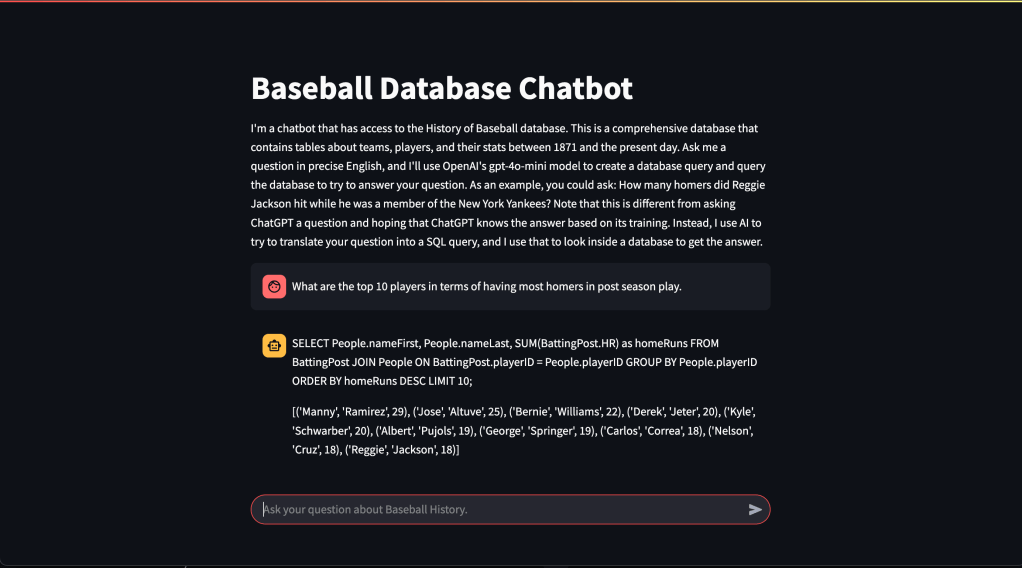
I’ve deployed this project as a container using Amazon Lightsail. If you’d like to try the baseball text2sql chatbot, click here. You can also look at my code in Github.
 Mike's ML