Is the Queen dead? ChatGPT has no clue. I’ll fix that using the OpenAI API, Amazon Lex, and the Wikipedia API
If you’ve used OpenAI’s ChatGPT you’ve no doubt noticed that it doesn’t know about events post-2021 because the training data used to train it was last updated in 2021. So if you ask it if the Queen is dead, ChatGPT will say “…as of my last knowledge update in September 2021, Queen Elizabeth II of the United Kingdom was alive.” Of course the Queen died in September 2022.
How can we use ChatGPT while incorporating more recent events? One idea is to augment it by calling out to other information sources that are more up-to-date. You could use news sources, for example. Actually, the OpenAI API now provides some interesting capabilities here, e.g., you could use ChatGPT to formulate a query to an external database based on the question you’re asking.
I built a chat bot using Amazon Lex, the OpenAI API, and the Python Wikipedia API library to allow you to get succinct answers on more recent events. I wrote a custom AWS Lambda in Python to tie all of this together. I started with some Python code from an AWS tutorial for a Lex chatbot for an online banking use case, but made a fair number of changes to it. The tutorial code was helpful in understanding the JSON format that Amazon Lex wants you to provide in order to interpret your responses (e.g., to provide Lex with OpenAI’s answers). You can see my Lambda function in Github. You’ll need to include your OpenAI API key in a Lambda environment variable if you want to use this. One slightly tricky thing is ensuring that Lambda environment has access to the OpenAI and Wikipedia API Python libraries. You need to zip those up with your Lambda code in a specific way, and upload the whole zip file to AWS via the Lambda console. It’s described well in this blog post.
Amazon Lex manages the user’s chat session. You can learn how to use it with a tutorial from AWS, so I’m not going to repeat that here. My Lex chatbot has just two “intents” (sections of the chat workflow): the first is to get the user’s input on the subject they want to research. The second is to get the specific question that they want answered. Lex lets you make calls to an AWS Lambda function to provide custom functionality at specific points in your chat (e.g., the end of each “intent”). When the user has told the chat bot the subject they want to research, my Lambda function uses the wikipedia-api library to check if a relevant Wikipedia page exists. This seems to work pretty well for common subjects. So if you tell the bot that you want to research, for example, Andy Rourke, the Smiths bassist who (unfortunately) recently died, it will find a Wikipedia page en.wikipedia.org/wiki/Andy_Rourke.
Now, having found that a relevant Wikipedia page exists, Lex asks the user to provide their question. Again, Lex calls my Lambda function, which retrieves a summary of the Wikipedia page (we could use the whole Wikipedia page text, if needed, but all of that extra text would increase my OpenAI API bill substantially, so I just decided to use the Wikipedia page summary). Now, having retrieved the Wikipedia text on the subject, we call the OpenAI API and ask OpenAI the user’s question, while providing the Wikipedia text as part of the prompt given to OpenAI. This results in quite accurate responses, assuming Wikipedia covers the user’s question, which could be anything that Wikipedia entries typically include–birth and death dates of famous people is just one example.
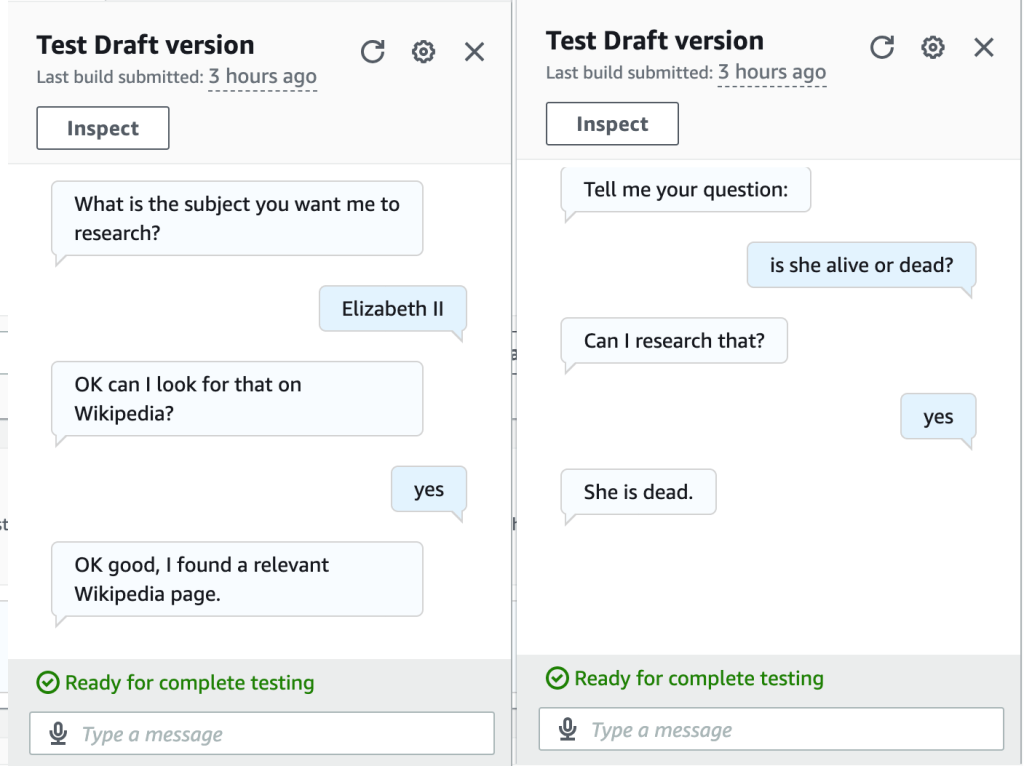
So for the question of whether the Queen is alive or dead, the bot provides the correct result (see below), whereas ChatGPT thought the Queen was still alive.
Finally, check out Andy Rourke’s bass line in the iconic Smiths song, The Queen is Dead. Upon Andy’s recent death, Johnny Marr said “…when I sat next to him at the mixing desk watching him play his bass on the song The Queen Is Dead. It was so impressive that I said to myself I’ll never forget this moment.”
 Mike's ML